Built-In Features
The App State University Calendar, hosted on the Localist calendar platform, is the primary resource for promoting on-campus events open to students, faculty, staff, and the broader community.
The calendar populates events via CSV and iCal feeds from 25Live, Sidearm, etc., and provides personalized calendar widgets to campus partners to showcase events on their websites. A standard template is used for all events, making event submission and promotion simple for Campus Partners. Simply reserve your event space in 25Live, answer the calendar questions, and your event will appear on the calendar, looking professional each and every time.
You can also utilize built-in features to create event registration, professional speaker profiles, and organized conferences. Keep scrolling to learn more.
- Conferences
- Registration
- Speaker Profiles
Conferences
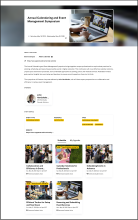
Users can create organized, visually engaging conferences with breakout sessions that include individual descriptions, photos, and speakers. Registration can be enabled for the entire conference and/or for individual sessions, and attendees can mark sessions as “Interested” even if registration isn’t required. All registered or marked sessions automatically appear in an attendee’s My Agenda, making it easy for users to track their conference plans.
To build a conference, begin by entering an event in 25Live and completing the calendaring questions in the Additional Event Information section. Select “Conference or Symposium” from the dropdown menu in response to the question, “Room reservation type.” Once submitted, the Calendar Administrator will contact you to begin the conference build process.
Registration
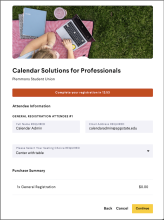
Registration is able to be built directly into an event. You can create multiple ticket or registration types, set up registration for different days, collect attendee information through custom questions, and even restrict registration using promo codes.
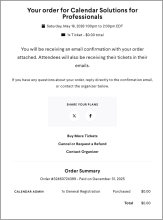
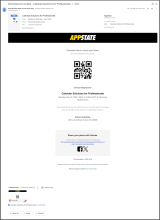
When a visitor clicks the "Register" button on an event, a pop-up slides onto the screen with registration details and questions. This allows the visitor to complete registration without leaving the event page. After registering, an attendee automatically receives an email confirmation with a QR code and key event details (date, time, and location).
You can also manually add registrants, track attendance using check-in, and view attendees who have expressed interest but have not yet registered.
To get started with the built-in registration, begin by entering an event in 25Live and completing the calendaring questions in the Additional Event Information section. Select “Calendar software registration (free events)” from the dropdown menu in response to the question, “Does this event use registration or ticketing?.” Once submitted, the Calendar Administrator will contact you to begin the registration build.
The built-in registration is available only for free events. Events that require ticket purchases must use alternative software, and the purchase link should be entered in 25Live by selecting “Other registration/ticketing” from the dropdown menu under the calendar question “Does this event use registration or ticketing?”.
Speaker Profiles
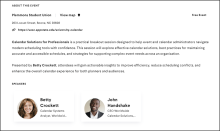
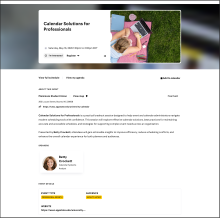
Speaker Profiles can be added to any event, creating a professional speaker card that links to a dedicated profile page. Profiles are stored in a speaker library, can be updated at any time, and reused for future events whenever the speaker returns.
Speaker Profiles not only create a professional appearance but also reduce the amount of text in your event description, making it easier for visitors to read and navigate your event.
To create a speaker profile, email the Calendar Administrator at calendaradmin@appstate.edu with your speaker’s details and the event you want to add the speaker to.
Speaker details: Name, Title, Email, Organization, Biography/Description, Photo, Website, and Social Media (Twitter, LinkedIn, Facebook, Instagram)