Add a 25Live Publisher Calendar to a Google Calendar
Adding a 25Live Publisher Calendar to your Google Calendar is quick and easy*. Just keep in mind that Google Calendars have an update/refresh period of up to 24 hours for information coming from 25Live.
*To add your 25Live Publisher Calendar to your Google Calendar, you will need to obtain the .ics URL from the Calendar Administrator. Email calendaradmin@appstate.edu for details.
Instructions:
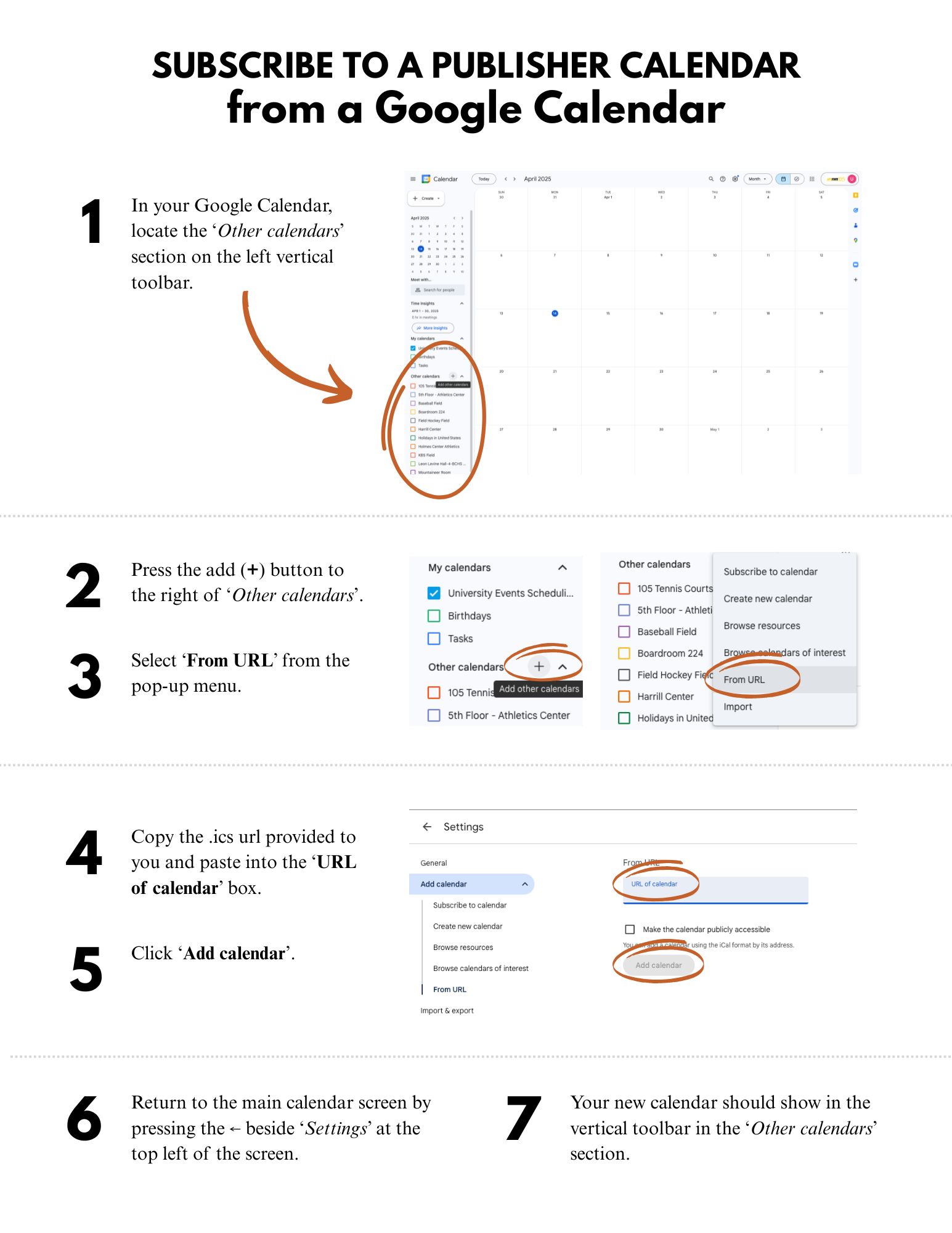
- In your Google Calendar, locate the 'Other calendars' section on the left vertical toolbar.
- Press the (+) button to the right of 'Other calendars'.
- Select 'From URL' from the pop-up menu.
- Copy the .ics URL provided to you and paste into the 'URL of calendar' box.
- Click 'Add calendar'.
- Return to the main calendar screen by pressing the <-- (left arrow) beside 'Settings' at the top left of the screen.
- Your new calendar should show in the vertical toolbar in the 'Other calendars' section.
Download instructions with images (pdf).